


 |
Wireless Portable Interactive Whiteboard CE FCC certificate
Product Details:
| Place of Origin: | Shenzhen, CHINA |
| Brand Name: | iBoard or OEM |
| Certification: | CCC, CE, FCC, RoHS, Reach, OHSAS, ISO9001, ISO14001 |
| Model Number: | IBX-U3 |
Payment & Shipping Terms:
| Minimum Order Quantity: | 10 |
|---|---|
| Price: | USD80-90 per piece |
| Packaging Details: | Carton Package |
| Delivery Time: | 30 days |
| Payment Terms: | T/T, L/C |
| Supply Ability: | 10000 units per month |
|
Detail Information |
|||
| Calibration: | Automatic(5s) / Manual (25/36 Points) | Technology: | Ultrasound |
|---|---|---|---|
| Resolution: | 32768*32768 | Aspect Ratio: | 4:3;16:9;16:10 |
| Whiteboard Type: | Portable Interactive Whiteboard, Portable Electronic Whiteboard | Type: | Whiteboard,Portable Interactive Whiteboard |
| Product Name: | Portable Interactive Whiteboard,China Wholesale Price USB Connection Portbable Interactive Whiteboard | Interface: | USB,USB2.0 |
| Warranty: | 1 Year | Application: | Meeting,Classroom,School Teaching,training,Education |
| Usage: | Classroom For Teaching,conference Room,household,Education Smart Boards,advertising | Support Os: | Linux,Window,WIN7/WIN8/WIN10/Android(optional),MAC,Android |
| Aspect Radio: | 16:10, 16:9... | Interface: | USB, VGA, RS232, HDMI |
| Screen Size: | 65",75",86", 98" | Multi-Touch: | Up To 40 Points |
| Hotkeys: | Two Sides Hotkeys | Shipping Way: | Sea Shipping Air Freight Truck Freight |
| Touch Points: | 20 Points | Power Supply: | AC 100-240V, 50/60Hz |
| Operation System: | Andriod/Windows/Linux/Mac.etc. | Accuracy: | 2mm |
| Mobile Stand: | Optional | Colors: | Black Or OEM |
| Highlight: | Wireless Portable Interactive Whiteboard,FCC Portable Interactive Whiteboard,FCC wireless interactive whiteboard |
||
Product Description
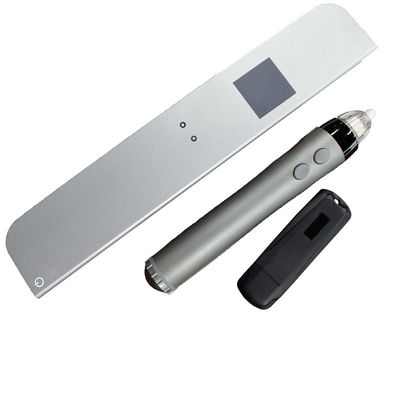
IBX-U3 Portable Ultrasound Interactive Whiteboard (Wireless Version)

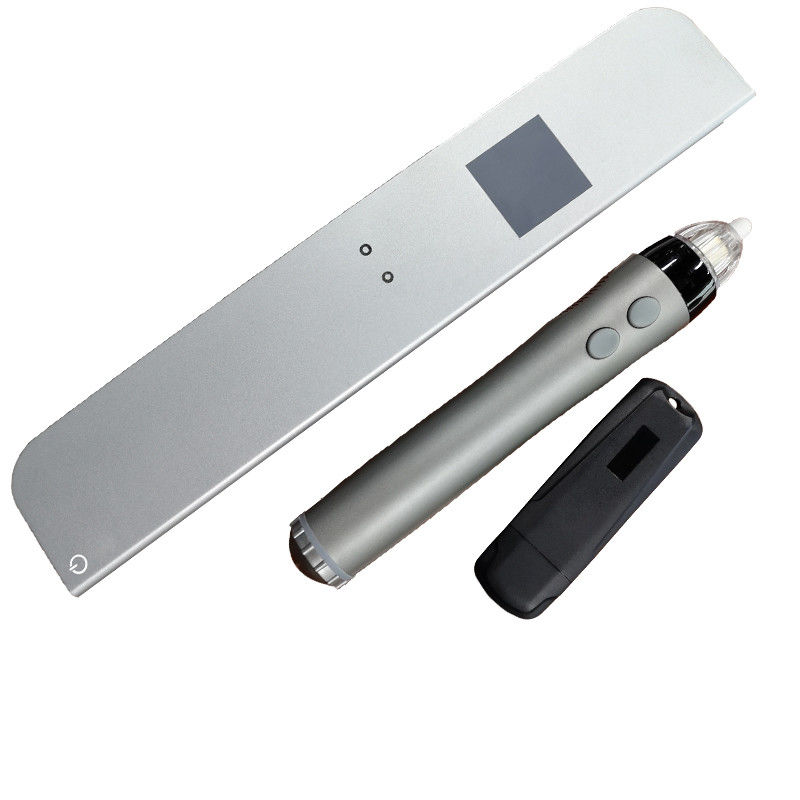
1. Product Composition
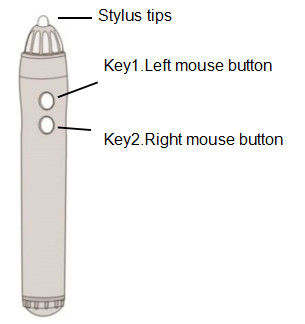
Interactive Stylus:
EWB Sensor:
EWB Sensor can be placed in any position around the writing board.
Calibration operation is required after first use or change of installation position.
Internal batteries are charged by connecting a USB cable to a computer or to a power adapter.
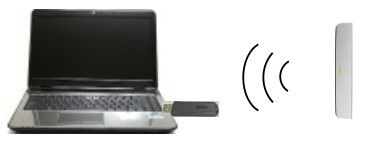
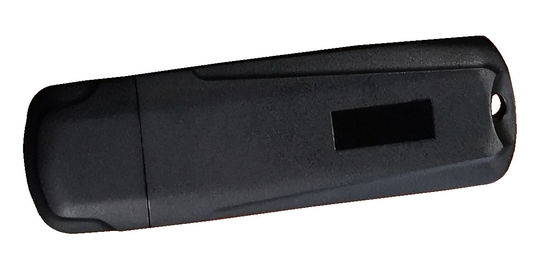
Wireless Dongle:
Connect computer USB interface to receive data sent by EWB Sensor
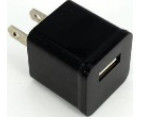
* Power Adapter:
Charging EWB sensor internal batteries, if charged with computer USB interface, no need for this accessories (Package without Power Adapter)
2. Connectivity
USB Cable or Wireless Dongle
3. Specifications
Interactive Stylus:
Battery:1 AA 1.5V battery
or 1 AA 1.2V rechargeable battery
or 1 AA 3.6V rechargeable battery
Battery life:30-60 hours
Dimensions:152mm * 25mm
Weight:50g
(Package without battery )
EWB Sensor :
PC Systems:Windows,MAC
Work area:3m * 1.5m
Power:USB or Internal battery
Battery life:3 hour charge time for 5 hours
Dimensions:227mm * 43mm * 11mm
Weight:100g
Power Consumptions:0.5W
Tracking Technology:Ultrasound
Wireless Technology:Bluetooth
Wireless Power:<10mW
Wireless Dongle:
PC Systems:Windows,MAC
Power:USB
Wireless Technology:Bluetooth
Wireless Power:<10mW
Power Adapter:
INPUT:AC100-240V,50/60Hz,0.5A
OUPUT: DC5V,≥500mA
| Model Number | iBX-U3 | |
| Dimension | 227mm x 43mm x 11mm | |
| Active Area | 30-80 inch | |
| Weight | 80 g | |
| Working Way | Wired | Wireless (Optional) |
| Power Input | USB power supply | AC100-240V; 50/60 Hz |
| Positioning Technology | Infrared and Ultrasonic | |
| Writing Way | Electronic Pen | |
| Response Speed | 3m/s | |
| Positioning Accuracy | 0.1mm | |
| Resolution Rate | Any resolution supported by the computer | |
| Data Interface | USB1.1 | |
|
|
Free drive design, support Windows®2000,Windows®XP, Windows®7, Windows®8, Mac OS, Linux, Android 4.0 above | |
| Operating Temperature | 10~35℃ | |
| Operating Humidity | 10~80% | |
| Accessories |
User manual, electronic pen, USB cable (5m/16ft), |
|
| Accessories Optional | Wireless module, the second electronic pen | |
4. Operation
Tun on
Long press power sign in upper left corner, turn on
Tun Off
On-state,Press the power sign in the upper left corner to turn off.
(Automatically shut down after 30 minutes of no operation)
Calibration
When the position of EWB Sensor, the position and area of projector change for the first time, calibration operation is needed.
- Turn EWB Sensor on and connect to the computer via USB or wireless.
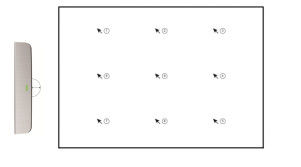
- Press the Stylus key2 for more than 3 seconds in a 2 cm radius semicircle near the center of the EWB Sensor front end. Hear a buzzer sound and indicate to enter the calibration mode. Meanwhile, the pointer on the screen jumps to the position of the first calibration point.
- As shown in the projection screen above, the point pointed by the arrow is the position of the calibration point. Click on the calibration point with the tip of the stylus. If the current calibration point succeeds, a click will be heard. At the same time, the pointer jumps to the next calibration point. When all nine calibration points pass, three clicks will be heard to indicate the success of calibration.
- If the calibration operation is wrong, please hold down the key1 of the stylus for more than 2 seconds, hear two short sounds, and exit the calibration mode at the same time.
- In the calibration mode, if there is no operating stylus for more than 30 seconds, two short sounds are heard and the calibration mode is automatically exit.
5. Indicator status light
Light off: Power off
Red light: Power on or fully charged
Red light Flashing: Low battery
Green light: Normal writing
Green light Flashing: Battery Charging
Orange light: Wireless disconnect
6. Package Contents
1 Interactive Stylus
1 EWB Sensor
1 Wireless Dongle:
1 USB Cable for Charge
1 Mounting plates
1 Adhesives strips
5 Stylus tips
7. Our Company Profile
Overall Rating
Rating Snapshot
The following is the distribution of all ratingsAll Reviews